A smart home is no longer the preserve of high-end new builds. With a well-established market of reliable products from brands such as Hive, Philips Hue, Drayton, and Ring, most UK homeowners and installers can build a genuinely useful connected home without an engineering degree or a six-figure budget. The key is to plan before you buy, choose an ecosystem that suits the property, and add devices incrementally rather than trying to automate everything at once.
Getting Started: Plan Before You Buy
The most common mistake when setting up a smart home is purchasing devices without first considering how they will communicate with each other. Smart home devices typically connect via Wi-Fi, Zigbee, Z-Wave, or a proprietary hub. A house full of devices from different ecosystems can work — but it may require more effort to integrate than a household that commits to one or two compatible platforms.
Before purchasing anything, ask three questions. What do you actually want to control — heating, lighting, security, or all three? Do the devices need to work without an internet connection in the event of a broadband outage? And who will be maintaining the system — a technically confident homeowner, or someone who needs everything to be simple?
Once those questions are answered, you can start selecting devices with confidence.
Smart Heating
Heating is typically the highest-impact area for a smart home upgrade. In the UK, where gas central heating dominates and energy bills are a constant concern, fitting a smart thermostat can meaningfully reduce consumption by heating only when and where it is needed.
Smart Thermostats
The Hive Active Heating Smart Thermostat is one of the most widely installed smart thermostats in the UK. It connects via a hub to the home’s broadband router and allows the boiler to be controlled from a smartphone app anywhere in the world. Setup is straightforward, the app is well designed, and the system is familiar enough that most homeowners take to it quickly. For a complete out-of-the-box solution that includes the hub, the Hive Thermostat for Heating with Nano 3 Hub bundles everything needed and is a practical choice where the customer wants a single purchase with no additional parts required.
For properties with multiple heating zones — separate upstairs and downstairs circuits, or underfloor heating alongside radiators — the Drayton Wiser Multi-Zone Smart Thermostat Kit is a more capable solution. The Wiser system allows each zone to be scheduled independently and integrates with compatible smart TRV heads at individual radiators, which means rooms that are seldom used can be kept at a lower temperature without manual adjustment. It is also a good choice for installers working on properties where Part L compliance and zone control documentation are required.
Thermostatic Radiator Valves
Smart thermostats work best when combined with thermostatic radiator valves, which limit heat output at each radiator based on the room temperature. Even in a non-smart setup, fitting good-quality TRVs pays off. The Drayton TRV4 Thermostatic Radiator Valve is a widely compatible, dependable option that fits most standard UK valve bodies and provides straightforward temperature limiting without any connectivity requirements. If you are running the Wiser system, Drayton’s smart TRV heads can be added later to bring per-radiator app control, making the TRV4 a sensible starting point even before upgrading to full smart control.
One practical note: always confirm whether the boiler supports OpenTherm modulation or dry contact switching before specifying a smart thermostat. A thermostat that can modulate boiler output — rather than simply switching it on and off — will deliver better efficiency gains over a heating season.
Smart Lighting
Smart lighting is often the first thing homeowners try, largely because it requires no rewiring in most cases. Bulb-based systems such as Philips Hue replace standard lamps and connect via a bridge, leaving the existing wiring and switches untouched.
Philips Hue
The Philips Hue Essential Starter Kit is the natural starting point. It includes a Hue Bridge — which connects to the router via Ethernet — and two E27 bulbs that can be dimmed and tuned between warm and cool white. From there, the system can be expanded room by room, with additional bulbs, light strips, or fittings added as needed. Voice control is available through Amazon Alexa, Google Home, and Apple HomeKit without any additional hardware.
For rooms where colour-changing light is not a priority — bedrooms, hallways, or utility areas — the Philips Hue White E27 Starter Kit offers the same platform and app control at a lower price point. Both kits use the same bridge, so a household can mix white-only and colour bulbs on a single system.
One installation consideration worth flagging: Hue bulbs must remain powered at the switch for the app and voice control to work. In practice, this means educating occupants not to cut power at the wall switch, or fitting smart switch covers that intercept the button press without breaking the circuit. In new builds and refurbishments, it is worth running a neutral wire to every switch position during first-fix — this costs little at that stage and keeps options open for switch-based smart dimmers later.
Smart Security
External security lighting and cameras are increasingly part of a connected home setup, and for good reason — they act as a deterrent, provide footage when something does happen, and can be monitored remotely.
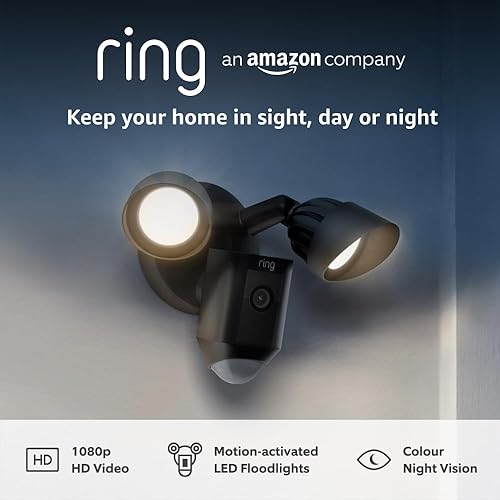
The Ring Floodlight Cam Wired Plus is a well-regarded choice that combines a PIR-triggered LED floodlight with a 1080p camera in a single wired unit. It connects to Wi-Fi and feeds live and recorded footage to the Ring app. Installation is a standard light fitting replacement — it connects to a fused spur and requires no separate power supply. Motion alerts can be configured by zone, and the two-way audio allows the occupant to speak to whoever is at the door or on the driveway.
The Ring app integrates with Alexa, so a Ring doorbell, floodlight camera, and smart lights can be grouped into a single routine — for example, triggering the front garden lights to come on whenever the camera detects motion after dark.
For external lighting that does not require camera functionality, the Timeguard FST24 Fused Spur Timer provides a simple, reliable way to control external lights on a fixed schedule. It replaces a standard fused connection unit and incorporates a 24-hour mechanical timer, making it a practical option where a smart system is not needed or broadband coverage at the installation point is unreliable.
Choosing an Ecosystem
With smart heating, lighting, and security each potentially running on different platforms, integration is a real consideration. The three main voice and app ecosystems in the UK are Amazon Alexa, Google Home, and Apple HomeKit. All three support a broad range of compatible devices, and most manufacturers — including Hive, Philips Hue, and Ring — support at least two of them.
If the household is already committed to Amazon devices, Alexa routines provide a simple way to link products from different brands. If privacy is a higher priority, Apple HomeKit keeps local processing on the home hub and limits data going to third-party servers. Google Home sits between the two and integrates well with Android households.
The key is to check compatibility before purchasing. A thermostat that works with Alexa but not HomeKit will be a problem in an Apple-centric household, and retrofitting is rarely simple.
Practical Tips for a Reliable Setup
A smart home is only as reliable as the network it runs on. Before adding smart devices, it is worth checking that the home Wi-Fi covers the areas where devices will be installed — particularly external cameras, garage controls, or garden lighting. A mesh Wi-Fi system or a well-positioned access point will prevent the connectivity dropouts that are the most common source of frustration with smart home products.
Keep the number of hubs to a minimum. Each additional hub is another device that needs power, a reliable connection, and periodic firmware updates. Where possible, choose products that use the same bridge or hub — Philips Hue and Hive each have their own, but both are compact and largely maintenance-free once installed.
Finally, consider how the system will behave when the broadband goes down. Most smart thermostats retain their last programmed schedule and will continue to operate in a basic mode during an outage. Smart bulbs will respond to the physical switch. Check the fallback behaviour of any device before installing it in a location where loss of control would be genuinely inconvenient.
Summary
Building a smart home does not require doing everything at once. Start with the area that will deliver the most benefit — for most UK households that is heating control, followed by lighting, then security. Choose products that are compatible with a single voice platform, invest in a solid Wi-Fi foundation, and add devices incrementally as confidence in the system grows. Done methodically, a connected home setup is reliable, genuinely useful, and straightforward to hand over to any occupant.